
The Make It Scannable Prompt: Turn Dense Walls of Text Into Magnetic, Inviting Sections
The secret to keeping readers hooked isn't perfect writing - it's strategic formatting.


10 seconds.
That's all you have to convince the reader your content is worth their time.
Developers scan, they don't read. When they hit your post and see massive paragraphs, they're gone before they even process the first sentence. It doesn't matter if you've spent hours crafting your copy - dense walls of text kill engagement before you even get a chance.
The best insights in the world won't matter if nobody sticks around to read them.
My Make It Scannable Prompt solves this by breaking any wall of text into bite-sized, digestible sections. You'll transform awful blocks into structured, scannable pieces that busy developers actually want to consume - and finish reading.
This article reveals the exact prompt and explains why it's a must-have for technical writers, complete with real before-and-after examples.
Making Your Content Scannable Isn’t Optional In 2025 - Here's Why
Readers don't have the attention span they used to have.
We all know what happened. Social media rewired our brains to crave quick hits of information. TikTok and YouTube Shorts made it 100 times harder for writers to keep anyone's attention for more than a few seconds.
Your audience doesn't read - they scan.
They open your article, scan the first few lines, and decide if it's worth their time. If they see a wall of text without line breaks, rhythm, or emphasis, they're gone. Doesn't matter how groundbreaking your insights are.
A mediocre article with a perfect flow crushes your best technical deep-dive that reads like a research paper.
Your readers aren't academics sitting in a quiet library with unlimited time. They're developers with 12 browser tabs open, Slack notifications pinging, and a deadline breathing down their neck.
They want you to solve their problem fast and let them move on.
When they see dense paragraphs, they'll bounce to someone else's article - even if yours has superior information. The best content in the world is useless if nobody reads it.
That's why scannable formatting isn't optional anymore - it's the only way to get your message across.
How Do You Make Your Content Scannable?
Break your text into bite-sized pieces that don't make readers work hard.
Who wants to read 20-line paragraphs? Your brain sees a wall of words and immediately looks for an escape route. Short sentences and small paragraphs fix this. They're easy to digest and don't overwhelm busy developers.
Whitespace is your best friend.
Don't be afraid of one-sentence and one-word paragraphs. They're not just acceptable - they're preferred for breaking up longer sections. Use them to create breathing room.
Perfect.
Also, mix short paragraphs with longer ones to create rhythm. Your readers' eyes need variety, not a monotonous, uniform blocks. Alternate between quick hits and explanations.
Do the same with sentence length. Follow a long, detailed sentence with a short punch.
Nothing more to it.
Split Long Sections with H3 Headings
When your section gets too long, break it up with subheadings.
H3 headings act like road signs - they tell readers what's coming next and give them natural stopping points. Use them when you have 7+ paragraphs or when you're shifting to a new concept.
Bold your key insights and transition points - entire sentences, not just words.
These become mental milestones that pull readers through your content. They're the first things readers see when they scan, so make them valuable and thought-provoking.
That's how you write for readers with short attention spans - and win.
Onto the prompt next.
The Make It Scannable Prompt In Action
Let me show you exactly what this prompt can do.
I took one of my own articles and deliberately ruined it. I removed almost all line breaks, stripped out the bolded text, and turned it into a dense wall of words:
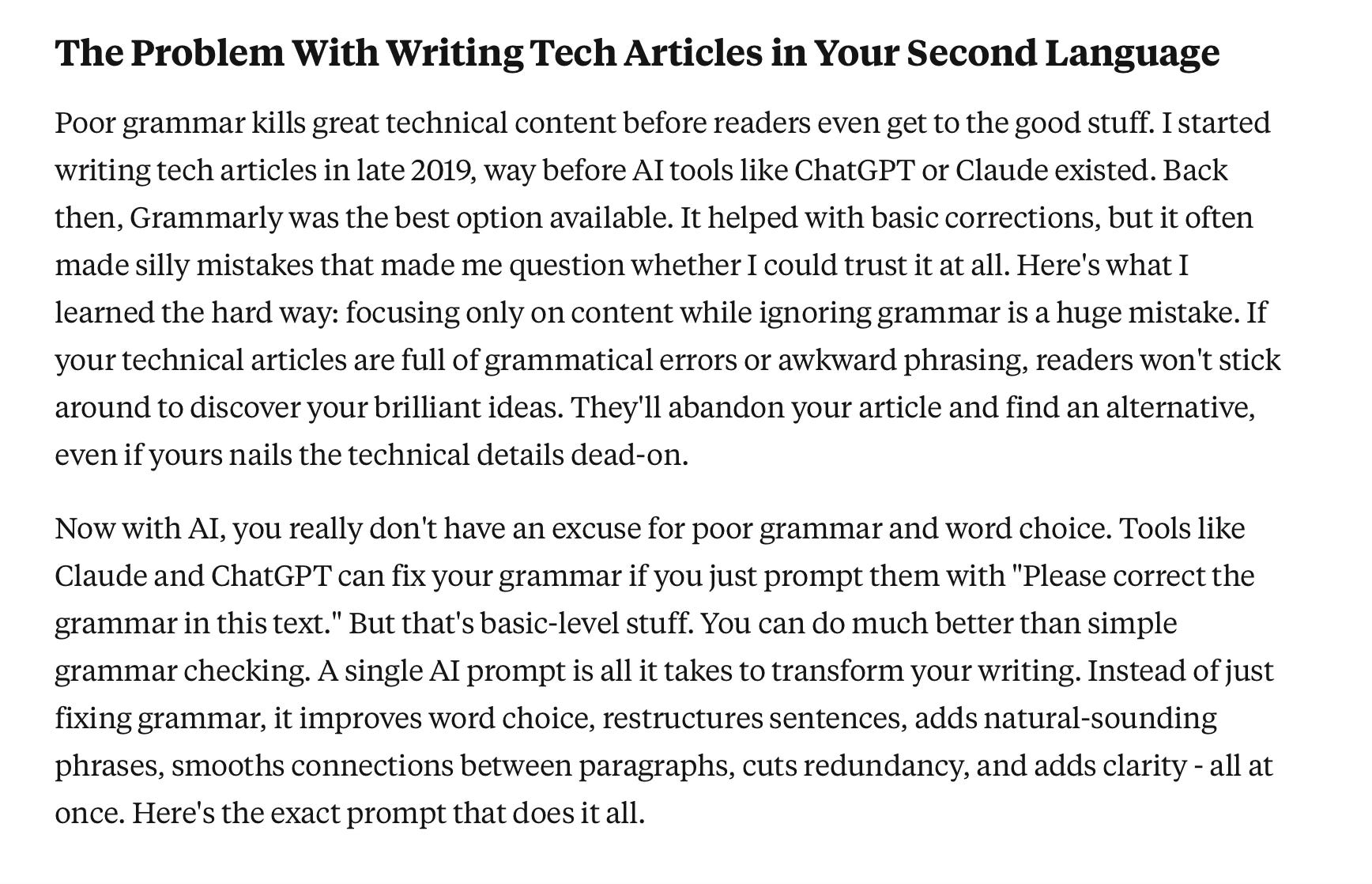
There's nothing wrong with the information - it's the presentation that sucks.
I wrote this content myself, but even I don't have the mental energy to read it. What's the chance of establishing a connection with busy tech professionals?
Zero.
After running it through the Make It Scannable Prompt in Claude, here's what came back:
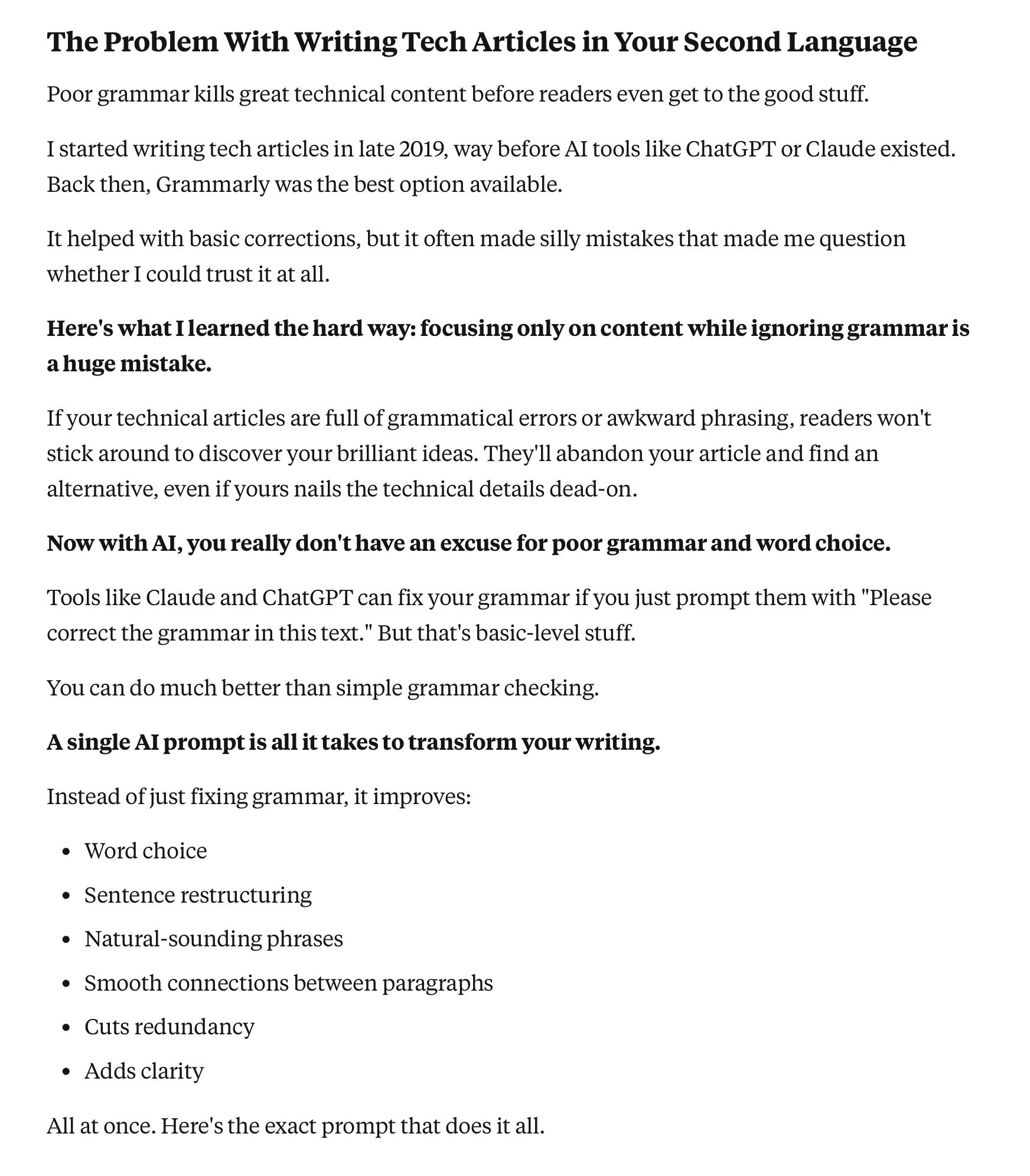
Same information, completely different experience - the prompt transformed an unreadable block into scannable, digestible content that actually invites you to keep reading.
Now, let me give you the prompt.
The Make It Scannable Prompt
My AI writing prompts are exclusive content for paid members. Here are three ways to access them:
Become a Paid Subscriber to Writing for Developers and unlock this prompt plus my entire archive.
Get the Tech Writer Prompt Vault for lifetime access to every prompt I use as a tech writer (updated monthly).
Become a Founding Member to unlock all content, prompts, the Tech Writer Prompt Vault, and every other premium product (present and future).
Here’s a glimpse into the Vault so you can see this prompt in action:
Now, let me show you the prompt.